¶ The menu (Hyperknox Display)
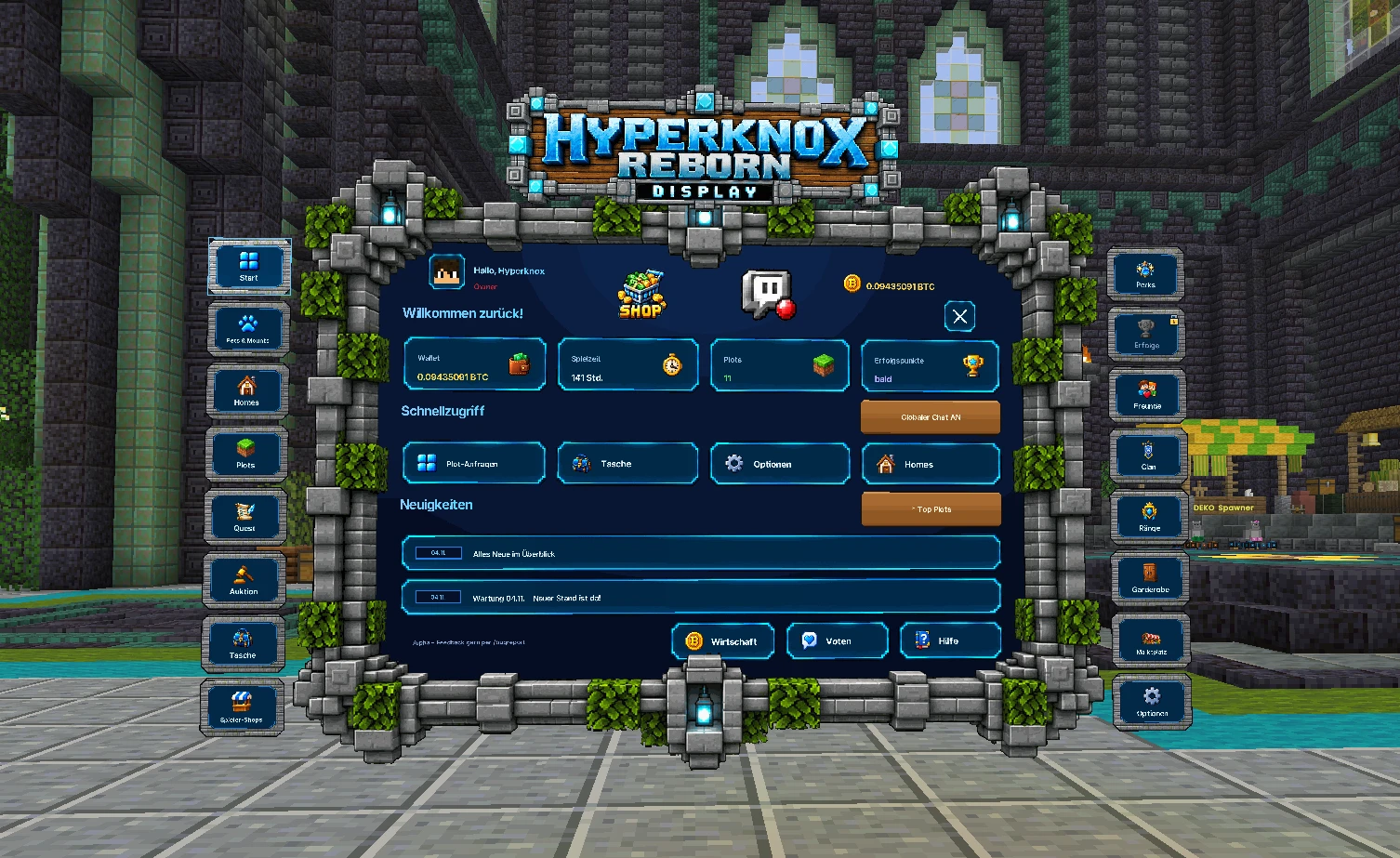
The menu is your main menu on Hyperknox. From here you get to almost everything:
your homes, your profile, voting, help and your settings.
The menu is not a chest window. It is a big screen that floats in the air in front of you.
Only you can see your menu. Other players do not see it.
¶ 1. Opening the menu
You have two options:
- Press the F key.
- Or type in the chat:
/menu(or/menüor/menue) and press Enter.
The menu now appears right in front of you.
Important: normally the F key swaps the item in your hand with your other hand.
That still works: hold sneak (usually the Shift key) and then press F.
¶ 2. Using the menu
You use the menu with your crosshair (the small cross in the middle of your screen):
- Look at what you want to click. It lights up.
- Press the left or right mouse button.
That's all. You don't have to walk or hold anything in your hand.
Back to the main menu: If you opened a window from the menu, the arrow ← at the top next to the X takes you back to the main menu – and so does pressing F again (for some windows also sneak, usually Shift). The X closes the window completely. If you open a window directly with a command (e.g. /auktion), there is no ←, and F closes it.
¶ 3. Closing the menu
- Press F again (or type
/menu). - Or click the X at the top right.
The menu also closes by itself when …
- you move more than 10 blocks away,
- you change world or server or get teleported,
- you do nothing in the menu for 1 minute. Then above your hotbar it says: “Menu closed after 1 minute of inactivity – open with F”.
No problem: just press F again.
¶ 4. How the menu is laid out
¶ Top (the header)
- Left: your greeting and your rank
- Middle: the Hyperknox logo
- Right: your money in the wallet and the X to close
¶ Far left and right: the tiles
🛠️ Current status 17.10.2026 – not finalised
Next to the menu there are small tiles with a picture and a name. Each tile is a page in the menu.
Click a tile, and the menu shows that page. The page you are currently on has a glowing frame.
| Page | Status |
|---|---|
| Start, Homes, Plots, Friends, Player shops, Ranks, Help, Settings, Vote | usable |
| Bag | opens the handbag |
| Clan | 🧪 test phase – see Clans |
| Achievements, Collection | coming soon |
| Auction | Opens the Auction House (not enabled on every server) |
You can already use the pages written in bold. The others say “Coming soon” – we are working on them right now.
A few tiles are still empty. New pages will go there later. You find your profile under Settings.
¶ 5. The pages
¶ Start
You always see this first when you open the menu.
- Top: “Welcome back!” and 4 cards with your most important numbers: Wallet (your money), Playtime, Plots and Achievement points.
- Middle: your Quick access. These are 4 big buttons to your favourite pages.
- Two small tiles: Right in the middle between the cards there is a Support tile (Knoxi as a picture): a click closes the menu and runs
/supportfor you. Further down, centred between Quick access and News, there is the LabyMod tile “10% off” with the small line “server partner”: a click closes the menu and opens the LabyMod shop page as a window (like voting: an “Open LabyMod shop” button, then you confirm the link).
You decide which 4 pages they are (see Settings). - Bottom: the News. Here you see the 2 latest messages from the server.
Click a news item and a window opens with the full text.
¶ Profile
Current status 20.10.2026 – found under F → Settings
Here you see everything about yourself: your rank, your playtime, since when you have been playing,
your plots, your VoteCoins and your language.
¶ Homes
Here you see all your homes on all servers.
- Left: at the very top the Portal (click = to the portal), below it the servers with a picture, the number of your homes and a dot:
🟢 you are here · 🔵 jumping there directly is possible · 🔴 only on site · ⚪ server is currently off. More servers? Mouse wheel. - Right: your slots on the selected server.
Left-click on a home = jump there · right-click = delete (only after confirming) · empty slot = set a home right here (you give it a name).
Quick: hold Shift (sneak) + click an empty slot = home set immediately, name automatic (e.g.home3). - When you hover over a slot, a short explanation appears at the bottom.
More about this: Homes & teleport.
¶ Plots
Your plots with a map from above, list, members, flags and your shop entry. Everything explained under Plots. On servers without plots (Farmwelt, Nether, End) this tile and the Plots card on the start page are hidden.
¶ Vote
Here you vote for the server and get VoteCoins for it. Everything about it is on the page Voting.
¶ Friends
Your friends: who is online and where? At the top “+ Add” and 🔔 notification on/off.
Left-click on a friend: on the same server a /tpa request, if they are offline an ⏰ alarm ·
right-click: remove (with confirmation) · requests: left = accept, right = decline. More about this: Friends.
¶ Player shops
All player shops: new ones at the top, then the most active. Search, jump there, open your own shop. Your own shop: /shops erstellen <Name> on your plot. More about this: Shops.
¶ Ranks
All rank benefits at a glance: at the top your ranks (Warp I–III, BattlePass) with expiry date,
below them the comparison table – at the top the benefits all Warp ranks have, below that what comes on top from Warp II and only with Warp III. When you hover over a row, a short note at the bottom says what the benefit means. If you click the row, a window opens – like with the news – with a detailed explanation, the values for Warp I, II and III, the status without a rank and your own rank (marked green). With the mouse wheel (or ▲ ▼) you see all rows. More about this: Ranks.
¶ Wardrobe (current status 20.10.2026)
On the far right, the Wardrobe tile opens the holo wardrobe: try on, mix and put on armour looks and costumes – with a 3D hero. The wardrobe is new – outfits will be added bit by bit over the next few days. More about this: Holo wardrobe.
¶ Help
Here you find 4 buttons:
- Report a bug (
/bugreport) – when something is broken - Submit an idea (
/idee) – when you have a wish for the server - Rules (
/regeln) - Wiki (
/wiki) – i.e. this page here
¶ Settings
Here you set up the menu the way you like it. Everything is saved for you – even if you leave and come back.
| Setting | What it does |
|---|---|
| Language | Click a flag. Then the menu is in that language (8 languages). |
| Click sound | On or Off: the quiet click when you click something |
| Open / close | On or Off: the sound when opening and closing the menu |
| Menu size | Move the slider: from 80 % (small) to 140 % (large) |
| Cosmetics → | Opens the cosmetics window (/kosmetik): fun name, particle trail, glitter name tag, arrival effect – depending on your rank. |
| Cooldowns → | Opens a window of its own with all waiting times as tiles – e.g. /kopf, /sendxp, emptying the Latinum Vacuum. Each tile shows ✔ ready or ⏳ how much longer. Go back with the button at the top right. |
| Scoreboard | On or Off: show or hide the box on the right of the screen – applies on all servers, also works with /anzeige. |
| Ender chest for others | visible or locked: whether others may view your ender chest with /invsee – even when you are on another server or offline. Your inventory stays visible. Not finalised – from the next update: the view shows items flat in the slots, the information about an item in a box below the window, and at the top it says whether the player is online or offline. |
| Tab list | Normal or Compact. Compact is narrower and also fits with a large GUI scale (3 or 4). |
| Name tags | Two switches: Others – show or hide the name tags above other players for you · Mine – show or hide your own tag above your head for everyone. Applies network-wide. Also works with /namensschild andere or /namensschild meins. Current status 21.10.2026 |
| Quick access | Here you see 4 tiles. Click a tile and it changes to the next page. Click as often as needed until the page you want appears. |
| Chat → DND mode | On or Off: up to 4 hours of quiet, nobody can reach you (like /dnd) – see DND mode |
¶ Problems? Help yourself
| Problem | Solution |
|---|---|
| I press F but nothing happens. | Type /menu in the chat. If that doesn't work either, report it with /bugreport. |
| I want to swap the item in my hand, but the menu opens. | Hold sneak (Shift) and then press F. |
| The menu is too small or too far away. | Go to Settings and move the menu size higher. If the menu seems very far away, that is often due to the field of view (FOV) in your Minecraft settings, potions or sprinting. |
| The menu is too big. | In Settings, set the menu size lower. |
| The sounds annoy me. | In Settings, set the click sound and/or open / close to Off. |
| I only see strange characters or boxes. | You have not loaded the resource pack. You need it, see FAQ. |
| The menu is suddenly gone. | You walked away, were teleported or did nothing for 1 minute. Just press F again. |
Hyperknox Reborn is still in alpha. The menu is constantly being extended – we add new pages here.
¶ Start page: auto /g and sights
- /g on / off (to the right of “Quick access”): if it is on, everything you write automatically goes into the global chat. With ! in front, a message stays local. More about this under Chat.
- ★ Sights (to the right of “News”): the most beautiful builds in the network, one click takes you there. More about this under Plot care.
¶ Calmer menus
Current status 22.10.2026
- The mouse pointer stays where you click. Pages, tabs and sub-menus of the same size now change inside the open window instead of closing and reopening it.
- Player names with Tab: in commands with a player name, Tab suggests every player who has been here before – even if they are offline. Part of the name is enough, upper and lower case do not matter.

Area: Chat & Friends · Related: Chat & community, Friends, Mail, Scoreboard & tab list