¶ Scoreboard & tab list
On Hyperknox you have two displays that show you everything important:
- The scoreboard – the box on the right of the screen. It is there from the start – but you can hide it.
- The tab list – it appears as long as you hold down the TAB key.
You don't have to switch anything on. Both are there automatically.
Do you only see boxes or strange characters instead of pictures? Then the resource pack is missing. See FAQ.
¶ Hiding the scoreboard
Current status 20.10.2026
Does the box on the right bother you? You can switch it off:
- In the menu (key F) → Settings → Scoreboard → tap On/Off, or
- type the command
/anzeige(toggles)./anzeige aushides it,/anzeige anshows it again.
Your choice applies on all servers and stays saved even after logging in again.
You still get important notices – e.g. that there is mail for you – in the chat.
¶ 1. The scoreboard (on the right of the screen)
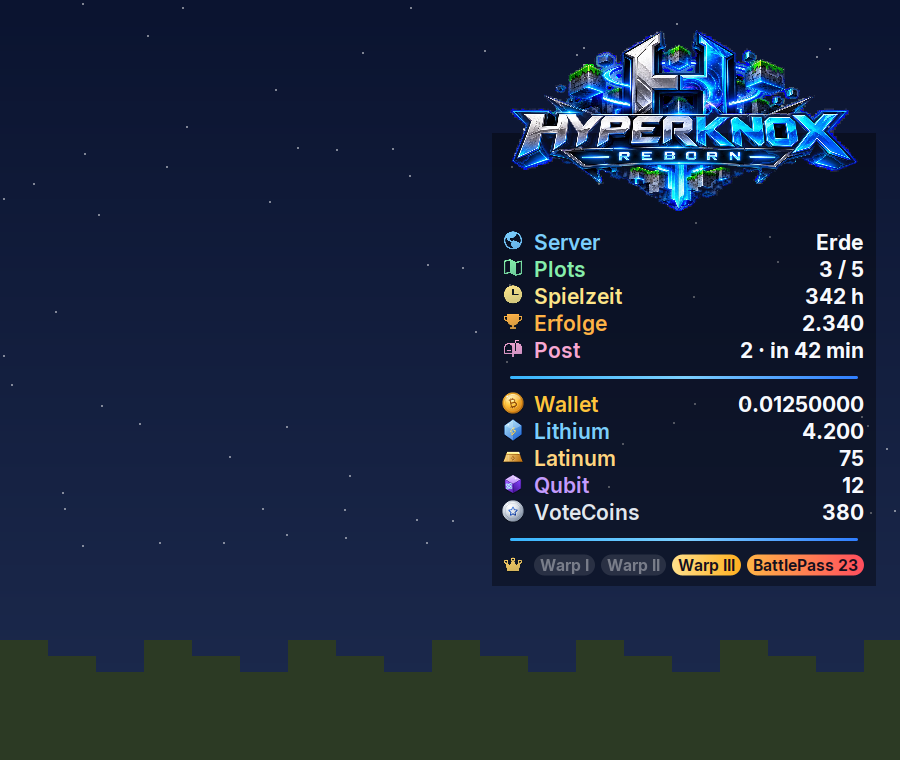
This is what the scoreboard looks like. The numbers in the picture are just an example – you will see your own values.
At the very top is the Hyperknox logo. Below it, line by line:
¶ Top part: about you
🛠️ Current status 16.10.2026 – not finalised
| Line | What it shows you |
|---|---|
| Server | Which server you are on right now, e.g. Erde or portal room |
| Plots | How many plots you have – and how many you are allowed. 3 / 5 means: you have 3, 5 are allowed. |
| Playtime | How many hours you have already played on Hyperknox |
| Achievements | Your achievement points. Coming soon – until then a dash (–) is shown here. |
| Your mail: e.g. how many deliveries are ready (collect them!) or how long the next one still takes. A dash (–) = no mail. More |
¶ Middle part: your money
| Line | What it shows you |
|---|---|
| Wallet | Your normal money (BitCoin). You buy and sell with it. |
| Lithium | A special currency |
| Latinum | A special currency |
| Qubit | A special currency |
| VoteCoins | The coins you get for voting |
More about money: Economy. You can also see all balances at once with /wallet.
¶ Bottom line: your ranks
At the very bottom there are 4 small signs: Warp I, Warp II, Warp III and BattlePass.
- A sign lights up in colour if you have this rank.
- A sign is grey if you do not have it.
More about ranks: Ranks.
¶ 2. The tab list (TAB key)
Hold down the TAB key (usually on the left of the keyboard, above Caps Lock).
As long as you press it, you see the tab list. When you let go, it disappears again.
The tab list shows all players in the whole Hyperknox network – not just those on your server.
¶ At the very top: the info line
Below the logo there is a line with:
| Display | Meaning |
|---|---|
| ● 20.0 TPS | How smoothly your server is running right now. 20 is perfect. The dot is green (all good), yellow (a bit slow) or red (slow). |
| Time and date | The current German time |
| $ and an arrow | The current real Bitcoin price in dollars. The green arrow ▲ means: risen, the red arrow ▼ means: fallen. |
| ● LIVE | Only appears when Hyperknox is streaming live on Twitch |
| … online | How many players are online in the whole network right now |
¶ In the middle: the players
When you log in, the wide view with logo is set. Compact only applies if you choose it yourself.
The players are shown in 3 columns – with the Compact setting (menu → Settings → Tab list) in 2 columns without the logo. For each player you see:
- their head and their name,
- their rank badge (see below),
- which server they are on right now (small picture),
- their connection (bars – the more bars, the better).
If more players are online than fit on one page, the list turns the page by itself every 6 seconds.
At the bottom it then says e.g. “Page 1/2”.
¶ At the very bottom: about you and links
- your playtime and your money in sat (satoshi – the smallest part of a bitcoin)
- the links to shop.hyperknox.de, discord.hyperknox.de and wiki.hyperknox.de
- the LabyMod code: Hyperknox
¶ The rank badges
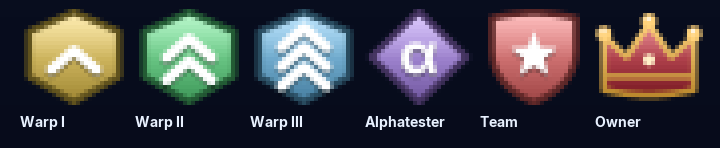
| Badge | Meaning |
|---|---|
| Yellow with 1 arrow | Warp I |
| Green with 2 arrows | Warp II |
| Blue with 3 arrows | Warp III |
| Purple with α | Alphatester |
| Red shield with a star | Team |
| Crown | Owner |
Players without a badge are Newbies – i.e. everyone who doesn't have a special rank (yet).
¶ Playing with LabyMod: clean display
LabyMod (Laby Client) changes the scoreboard and the player list on your screen by itself. Because of that, the Hyperknox display can look shifted, faded or wrong. For a clean display, change two things in LabyMod:
- In game, press the right Shift key. The LabyMod menu opens (if you changed the key, use yours).
- Type the word Scoreboard into the search at the top.
- Turn the LabyMod Scoreboard off.
- Search for Flux and turn the Flux addon (plugin) off.
- If LabyMod asks for a restart afterwards, restart Minecraft and join
hyperknox.deagain.
The player list: if LabyMod has its own options switched on under Player list (grouping, friends on top, server info ...), it can look different from what is described here. Switch those options off.
Menu names can change with LabyMod updates. The search in the LabyMod menu will still find them.
¶ Problems? Help yourself
| Problem | Solution |
|---|---|
| I see no scoreboard (and no hotbar either). | You accidentally pressed F1 – that makes Minecraft hide everything. Just press F1 again. |
| I see no scoreboard, but everything else. | Go to the portal room once (/portal) and back. If that doesn't help, report it with /bugreport. |
| I only see boxes instead of pictures. | The resource pack is missing. See FAQ. |
| A friend is missing from the tab list. | Maybe they are on another page of the list. Wait 6 seconds, the list turns the page. |
| Achievements only shows a dash (–). | That's correct – achievements are coming soon. |
| Mail only shows a dash (–). | Then you have no mail right now. |
| The tab list is cut off with a large GUI scale. | In the menu under Settings → Tab list, switch to Compact (2 columns, without the logo). |
| The scoreboard looks odd (shifted, faded, frame missing) or the player list is different, and you play with LabyMod. | See section Playing with LabyMod: clean display. |

Area: Chat & Friends · Related: Chat & community, Friends, Mail, The menu (Hyperknox Display)