¶ Storage chests (/sc)
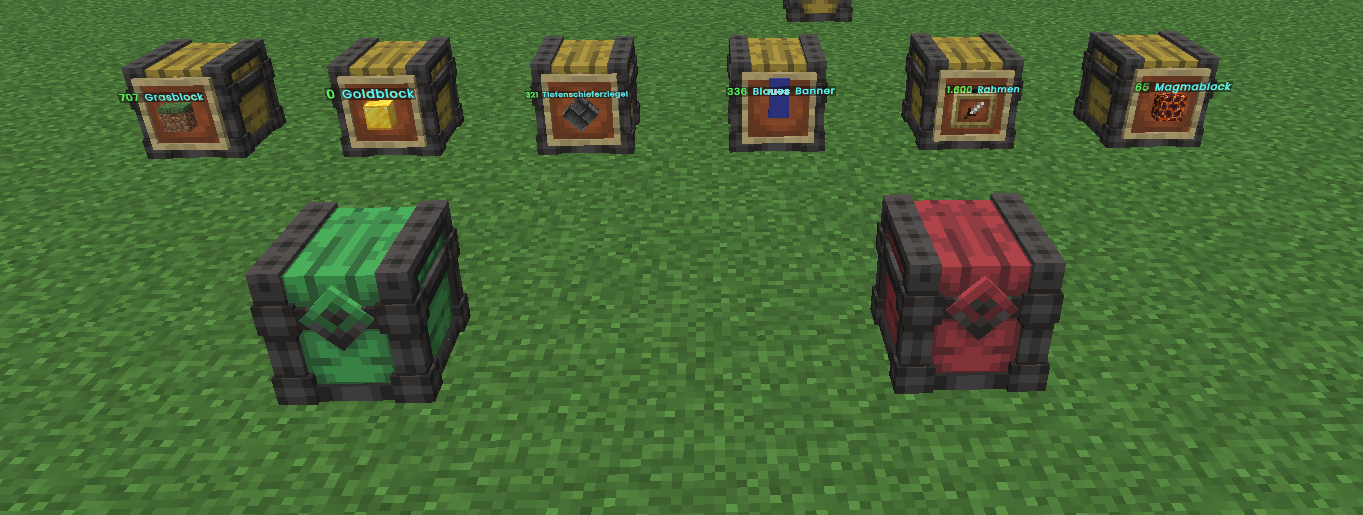
Put everything into one chest – every item finds its own storage chest. No hoppers, no redstone, no item filters.
¶ The three chests
| Chest | Colour | Job |
|---|---|---|
| Input chest | green | Put everything in here. Items move on by themselves. |
| Receiver chest | light yellow | Stores one item type with no upper limit ("unlimited"). |
| Unsorted chest | red | Catches everything that fits nowhere. |
¶ How it works
- Hold chests in your hand – ideally the whole stack.
/sc create send(input),/sc create receiveror/sc create unsorted. The whole stack is converted: 64 chests become 64 storage chests. It costs nothing, only your chests are used up.- Place the chests – never directly next to each other, always leave a gap. A normal chest may not stand directly next to a storage chest either. Furniture with a chest (decoration) does not count as a normal chest.
- For the receiver chest: attach an item frame to the chest and put the item it should store into the frame. The framed item is the type. The frame must hang on the front of the chest (the side it faces); on any other side it does not set a type. To hang it, hold the item frame and sneak + right-click the chest (without sneaking, the chest opens).
- Place at least one unsorted chest so nothing stays behind.
All three chests open like a double chest. The receiver chest shows the exact amount in its title, for example "20.500 Cobblestone", and is always completely filled with its item. Take items with a click (whole stack), right-click (half) or shift-click. Put items in with shift-click on a matching stack in your inventory.
¶ Range
- An input chest reaches 20 blocks in every direction (41 × 41 blocks) over the full height and depth.
- Receiver and unsorted chests outside this area are not reachable. Their items go to the unsorted chest.
/sc showrange onshows the area as orange stars,/sc showrange offhides it. On plots it only shows the part up to the plot border – only there is anything reachable.
¶ Rules
- On plots only your own plot counts (also a merged plot group). Roads and other plots cannot be used, even if the range reaches them. Each plot may have one input chest. This also applies in the map world.
- Farm world, Nether and End: you may build several input chests, each at least 41 blocks (in X or Z) from the next. If you are too close you get a "too close" message. The areas must not overlap. On every reset of the farm world, Nether and End, the chests disappear together with their contents, without refund.
- Not every item is sorted: only unchanged vanilla items (blocks, logs, planks, stairs, flowers, ice, buckets …). Enchanted or damaged items, admin items and items with special data end up in the unsorted chest.
- Access is like normal chests: on plots only owners and trusted players (also on clan plots). There is no protection in the farm world, Nether and End.
- Hoppers may put items into the chests and take them out.
- Breaking: A storage chest can only be broken when empty – this applies to all three chests. When a plot is deleted, the chests disappear together with their contents, without compensation.
¶ Emptying
Look at the receiver chest and type /sc empty: the contents go into your inventory. If you carry a matching Hyper compressor, you are asked whether it should be filled. On Yes it is filled until full and you get the rest in your inventory as far as there is room. Whatever does not fit stays in the chest. This also applies when you take something out in the receiver chest window: with a matching Hyper compressor in your inventory you are always asked. Yes empties the chest into the compressor as above, No only takes the amount you clicked into your inventory. It is never filled automatically. Already when you open the receiver chest (right-click) it asks whether the compressor should be filled completely if the chest holds the same block your compressor takes. The compressor's setting does not matter. Yes fills only the compressor (the rest stays in the chest), No opens the chest normally.
If a plot is deleted, the chests on it disappear together with their contents – without compensation.
Works on Earth, Evergreen, Farm world, Nether, End and the map world.
¶ One type per input chest
Within the area of an input chest each type can exist only once. If you put an item into the frame of a receiver chest and a receiver chest of that type already exists within reach of the same input chest, placing is refused: the item stays with you, the frame stays empty, and the message names the existing chest with its coordinates. This applies to everyone, including staff. Taking the item out is always allowed; once the first chest is removed the type is free again. If the area is not loaded right now you are asked to try again in a moment.
¶ Frames only in front
Frames (normal, glow and invisible) can only hang on the front of the receiver chest of a storage chest. The input chest and the unsorted chest carry no frame, and none works on the sides, top or bottom. If you try, the frame is refused and stays with you. This applies to every player, including the team. A frame that already hangs in a wrong place falls out once, with its content, the next time the chest is opened – you pick everything up again, nothing is lost.
¶ Which frames work – and where do I get them?
Every kind of frame works: item frame, glow item frame, invisible frame and invisible glow frame. The item in the frame sets the sort. Invisible frames cannot be crafted yourself. You buy them from the Satoshi Baron in the Miscellaneous category: single use (turns back into a normal frame when broken) 50 Sat, reusable (stays invisible when broken) 500 Sat. The invisible glow frame costs the same in each case.
¶ Hoppers and loops
You can pull from the receiver and unsorted chest with hoppers into farms, furnaces or storage chests. Back into an input chest is not possible this way: what comes out of a storage chest – even through several hoppers, minecarts, droppers or chests in between – is not accepted by the input chest via hopper again. So no endless loop (receiver → hopper → input → receiver) can run. Nothing is lost and nothing is duplicated, the items simply stay in the last hopper. Putting an item into the input chest by hand is not affected. This also holds when the way leads through a copper golem, a crafter, an allay or a shulker box. Carrying items around by hand (even placing a shulker box by hand) is your own decision and is not blocked. If the server has to track an unusually large number of such item paths at once, no input chest accepts anything via hopper for a while until that eases – the items then simply stay in the hopper.
¶ Amount display
A fixed number stands in front of the receiver chest (it does not turn with you): the amount in bold light green, light red when the chest is full, next to it the item name in light blue in your language. It sits slightly in front of the chest in the upper half, in front of the frame and sign, and stays within the block in front even if the chest is built into a wall. Sneak + right-click the chest to switch it on or off (with a frame in your hand you hang the frame instead). The setting applies to everyone and survives restarts. Owners and authorised players can switch it, staff always.
Changing the frame only takes effect once the receiver chest is empty; an open window closes as soon as the type changes. Copper golems do not deposit into storage chests, and only unchanged items are sorted in.
¶ Back to a normal chest?
No. As a player you cannot turn a storage chest back into a normal chest. You can only break it when it is empty. Only the team can remove a storage chest.

Area: Plots & Building · Related: Plots, Plot care & sights, Evergreen – plots in nature, Map world