¶ Item texts in your language
Status: in progress – not final. This feature is being built right now. This page already explains how it will look.
¶ What happens
- Everyone sees the name and description of our items in their own language. What counts is the language you picked: F menu → Options → Language (or /sprache). When you join for the first time, you also pick it in the welcome window.
- The item itself stays the same. If you give an item to a friend who uses another language, they read it in their language – nothing about the item changes. Trading, selling, mail and chests work as always.
- Numbers and values are the same everywhere: levels, amounts, durability and prices. Only the words are translated.
- When you change your language, the game may reload briefly. After that your items show up in the new language.
¶ Colour gradients
Many of our items have coloured names with a gradient, for example Mythical Knowledge or clan items.
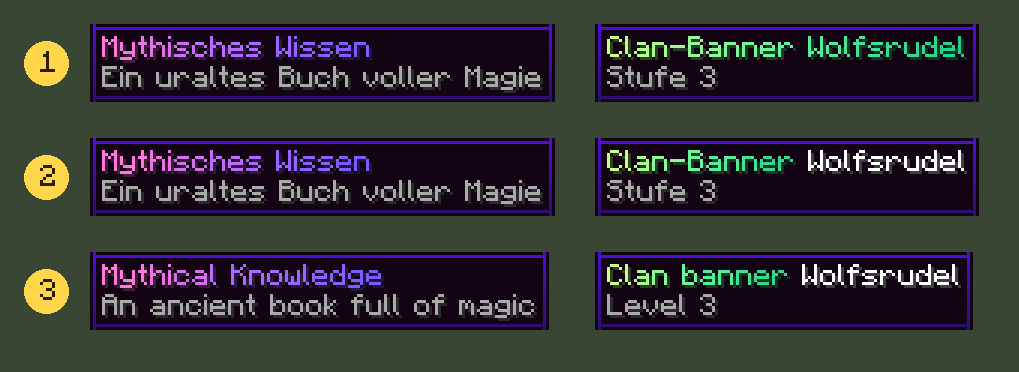
- Before: the gradient runs over every single letter, including the clan name.
- From now on (German): the gradient has 8 colour steps. On item names you can hardly tell the difference. The clan name is one colour.
- From now on (English): a player using English sees the same item in their language, with the same gradient.
Names of players and clans (everything you type in yourselves) stay one colour. They are not translated but shown exactly as written.
¶ Why 8 colour steps?
A gradient over every single letter would need a technique that can switch off the whole Hyperknox pack on some computers. Then menus, icons and windows would be missing. That's why we use 8 steps: it runs safely everywhere and looks almost the same.
¶ Good to know
- Your own texts such as signatures (
/sign) and names you give things yourself stay exactly as they were written. - Without our resource pack you see the texts in the language the item was created in.
- Please report bugs or strange texts with /bugreport.

Area: Items & Tools · Related: Handbag, Longlife-Items beim Uralten Schmied, Custom enchantments, Book of Mythic Knowledge